
Finally fixed Wi-fi driver issue on Linux

When I first faced this issue exactly 3 years ago, I did not realise this would turn into multi-OS, firmware-level investigation that would take me 3 years to completely understand.
It first appeared on my first installation of Ubuntu in 1st year during Linux Party by SDS Labs. The connection worked for a while, then disappeared, then reappeared disappeared again after reboots. I kind of gave up on Linux for a while, before I came stronger in in 3rd year. This blog will be a documentation of that, and a reference for future troubleshooting.
Part 1 - Troubleshooting in Ubuntu
When it failed, NetworkManager (sudo systemctl status NetworkManager) showed nothing useful. The interface still existed, but scans with nmcli dev show wlo1 and GNOME settings failed. The first instinct in situations like this is always to check whether the hardware is even being detected, so I started with the usual sanity check:
bash# Show Realtek PCI Wi-Fi device and hardware ID
lspci -nn | grep -i realtek

# 01:00.0 Network controller [0280]: Realtek Semiconductor Co., Ltd. RTL8852BE PCIe 802.11ax Wireless Network Controller [10ec:b852]
# Kernel driver in use: rtw89_8852be
bash# Show detailed network hardware info and which driver is bound
sudo lshw -C network

# *-generic DISABLED
# driver=rtw89_8852be
# firmware=N/A
Showed the interface as DISABLED with firmware=N/A, despite firmware being installed.
To see what was actually going wrong, the kernel logs:
bash# Show kernel log messages related to the rtw89 driver
sudo dmesg | grep rtw89

# FW does not process h2c registers
# HW scan failed with status: -110
# xtal si not ready
# mac init fail, ret:-110
Exposed the real failure:
The error code -110 is a timeout. The kernel was sending commands to the Wi-Fi chip and never getting a response. Other persistent errors mac init fail and xtal si not ready are also highlighted later in the blog.
Trying to install updated rtw89
Maybe manually installing updated driver would help.
bashgit clone https://github.com/lwfinger/rtw89
cd rtw89
make
bash# /home/utsah/rtw89/mac80211.c:1177:50: error: ‘hw’ undeclared here (not in a function)
# /home/utsah/rtw89/mac80211.c:1177:35: error: too many arguments to function ‘rtw89_ops_stop’
# /home/utsah/rtw89/mac80211.c:69:13: note: declared here
The build failed with errors about incompatible function pointers. I tried patching.
These errors were being caused by mismatch between kernel API and the driver.
Finally, updating the kernel to 6.14 (or any other newer mainline version would work) and the build suddenly worked. One of my friends, Shoaib (https://github.com/shoaib-31/), helped me with kernel version and GCC version mismatch I kept getting during the build.
rtw89 wiki :
rtw89has been included in the mainline Linux kernel since version 5.16 (so newer kernels provide in-tree support) and Realtek 8852BE support is generally enabled for kernels 6.1 and newer as long as the distro config includes the options.
When later mainline kernels 5.16+ were released, rtw89 driver was in-tree included in the kernels, so recently when I installed Arch (6.18.2-arch2-1), the driver worked out of the box.
Part II - Enter Arch
I recently installed Arch Linux alongside Ubuntu. The issue returned on Arch, but crucially, it broke Ubuntu as well. Even booting back into your "known good" Ubuntu setup resulted in broken Wi-Fi. 🙂 That is where things became genuinely confusing.
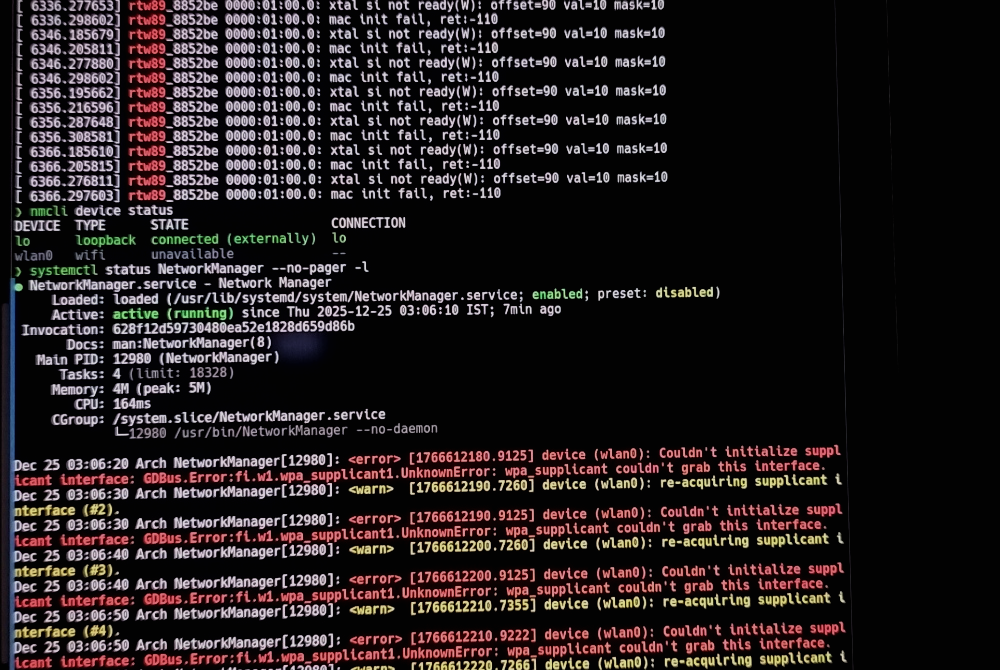
Symptoms
A normal reboot does not fully power-cycle PCIe devices. The motherboard keeps supplying standby power. The Wi-Fi card never truly resets. When Arch loaded its kernel and sent a bad command, the chip’s internal firmware crashed. When I rebooted into Ubuntu, the good driver tried to talk to a chip that was already in zombie-state. That is why the same mac init fail and xtal si not ready errors kept appearing even on a known-good kernel.
I noticed the issue was triggered or worsened when the laptop was plugged into AC power. A "Cold Boot" (holding power button to drain capacitors) fixed it temporarily, but plugging in power killed it again.
Fixed the real power management issue
Came across an GitHub issues thread link which suggested to add these configuration lines.
bash# /etc/modprobe.d/rtw89.conf
options rtw89_pci disable_aspm_l1=y disable_aspm_l1ss=y
PCIe Active State Power Management or ASPM was the issue. When the Wi-Fi link is idle, the kernel tells the device to enter low-power states called L1 or L1 Substates. When traffic resumes, the device is supposed to wake up instantly. My current wifi driver did not handle this well leaving the hardware in a 'zombie' like sleep state. The kernel would request a wake-up. The chip would fail to wake correctly, thus the timeout Error -110. From that point on, the device was effectively dead until a full power drain.
disable_aspm_l1=y: Tells the driver never to allow the L1 sleep state.disable_aspm_l1ss=y: Explicitly disables the deeper sub-states.
After applying this and rebooting, the errors disappeared. dmesg was clean. Also, Plugging in the charger no longer killed the interface.
The key takeaway is that kernel power management can affect hardware state directly. This turns a driver issue into a cross-OS hardware problem.
List of debugging commands
P.S. here is a list for future reference :
bash# Show currently running kernel version
uname -r

# List all network interfaces and their state
ip link show

# Show device state and attempt Wi-Fi scan
nmcli device status
nmcli device wifi list

# Show NetworkManager status
systemctl status NetworkManager --no-pager

# Check whether rtw89 drivers are loaded
lsmod | grep rtw89

# Check if Wi-Fi is soft- or hard-blocked
rfkill list

# Show Realtek PCI Wi-Fi device and hardware ID
lspci -nn | grep -i realtek

# Show detailed network hardware info and which driver is bound
sudo lshw -C network

# List installed Realtek rtw89 firmware files
ls -l /lib/firmware/rtw89

# List installed kernel versions
apt list --installed | grep linux-image    # ubuntu
pacman -Q | grep arch2                     # arch

# Show kernel log messages related to the rtw89 driver
sudo dmesg | grep -i rtw89

# Check Secure Boot state (blocks unsigned drivers)
mokutil --sb-state